Listo para Subir Guide

The Colombia visa photo: a JPG under 300 KB

Written by Maxime JeanVerified 30 August 2026Report an error

I write these guides from the experience of preparing real filings, not as a lawyer or an immigration adviser. Every figure I quote links to its official source with the date I checked it. If something here is out of date, write to me and I will fix it.

The photo does not go inside your document PDF. It is uploaded on its own, with its own rules, and it is one of the things most often rejected over a formatting detail.

Official photo specification

Source: Visa en línea guide, Ministry of Foreign Affairs of Colombia (cancilleria.gov.co). Checked 30 August 2026.

Always confirm what the portal shows before submitting. If the screen states a different figure, that one wins.

Why 300 KB is so little

A photo from a modern phone weighs between three and eight megabytes. The portal limit is 300 kilobytes. You are reducing it to a twentieth or less.

This is where people fail in both directions. Either they upload it as-is and the system rejects it, or they crush it until the face breaks into blocks, and then a human rejects it instead of a machine.

The middle ground is comfortable. A document photo does not need to be big: it is a few centimetres of paper. At the right resolution, 300 KB is more than enough for a sharp face.

Taking it

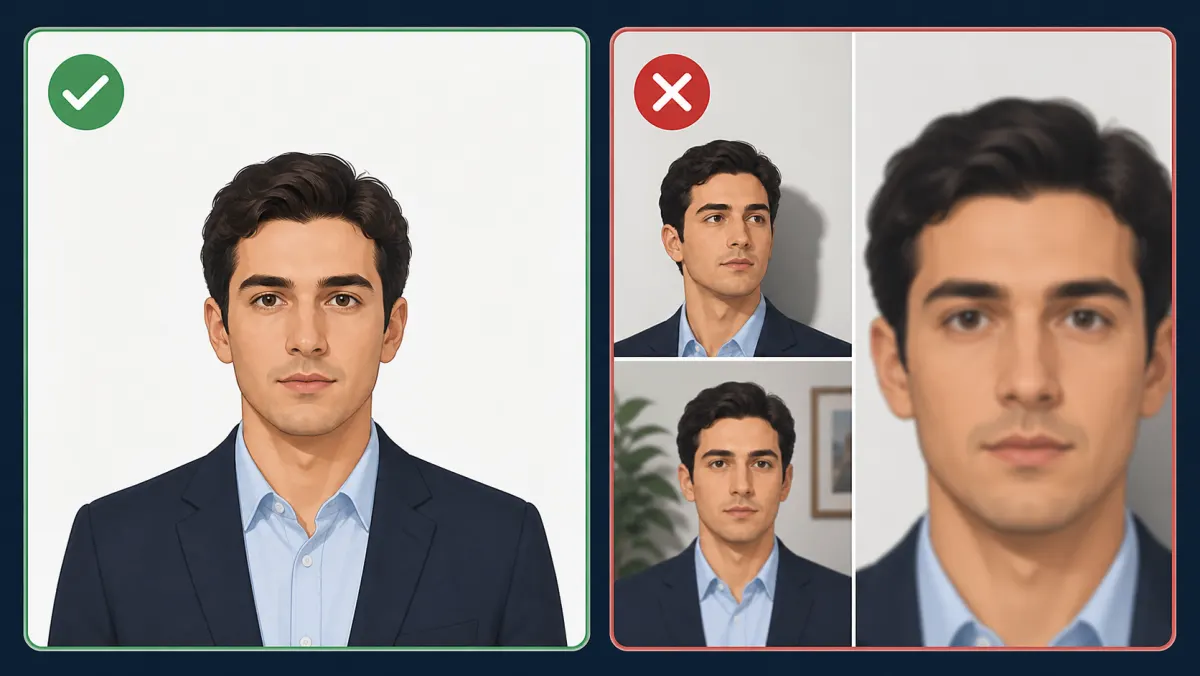
An actually white background

White. Not beige, not light grey, not your living room wall. A large sheet of paper, a white door or a plain sheet all work. And no shadow cast behind your head, which is what ruins most backgrounds.

Light in front, never behind

If the window is behind you, you are backlit and your face goes dark. Face the window, with light arriving from the front or slightly to one side. No direct flash: it flattens the face and blows out the background.

Framing

The ratio is 4 high by 3 wide, so portrait orientation. Head centred, looking at the camera, neutral expression, no sunglasses, no hat. Leave a little space above the head and frame down to the top of the shoulders.

Do not use portrait mode or any beauty filter. Blurring the background moves it away from the plain white they asked for, and filters alter your features.

Getting it to 300 KB

You need a JPG, not a PDF. This tool produces PDFs, so for the visa photo the route is different:

  1. Crop to a 4:3 portrait ratio in your phone or computer photo app.
  2. Export as JPG at a sensible resolution. Around 600 by 450 pixels is plenty for a 4 by 3 centimetre photo.
  3. Check the weight. If it is still above 300 KB, lower the export quality before reducing the pixel dimensions.
  4. Open it at 100 percent and look at the eyes and the outline of the face. Square blocks mean you pushed compression too far.

A shortcut worth knowing: reducing pixels drops the weight far faster than lowering quality, but it is also what costs you definition. Crop well first, then adjust quality, and only reduce pixels as a last resort.

The documents are a separate problem

The photo has its own limit. The documents go separately, as PDFs, with a 5 MB ceiling for the whole set. If that is the side you are fighting, the tool does help, and the Colombia visa documents guide explains how to spread the budget across files.

Open the tool preset to 5 MB for the documents

Mistakes that cost you a requerimiento

Open the tool →
Free, no account. Everything runs in your browser and no document is uploaded anywhere.

Common questions

What format and size does the Colombia visa photo need?

According to the official Visa en línea guide: JPG, 300 KB maximum, in colour, white background, 4 cm high by 3 cm wide.

Can I put the photo inside the documents PDF?

No. It is uploaded separately as a JPG. Documents go as PDFs, one per requirement.

How do I get a 5 MB phone photo down to 300 KB without it looking pixelated?

Crop to 4:3 portrait first, export at around 600 by 450 pixels, then lower export quality until it drops below 300 KB. Check the eyes at 100 percent for blocking.

Does a selfie work?

Only if it meets everything else: plain white background, light from the front, neutral expression, no filters or portrait mode, portrait framing to the shoulders.